소스코드만 바라보다가 메일 정리를 하고 싶어서 n8n 메일 라벨링을 완료했다.
그런데 알림 기능을 단순하게 사용할수 있는게 있어서 적어보려 한다.
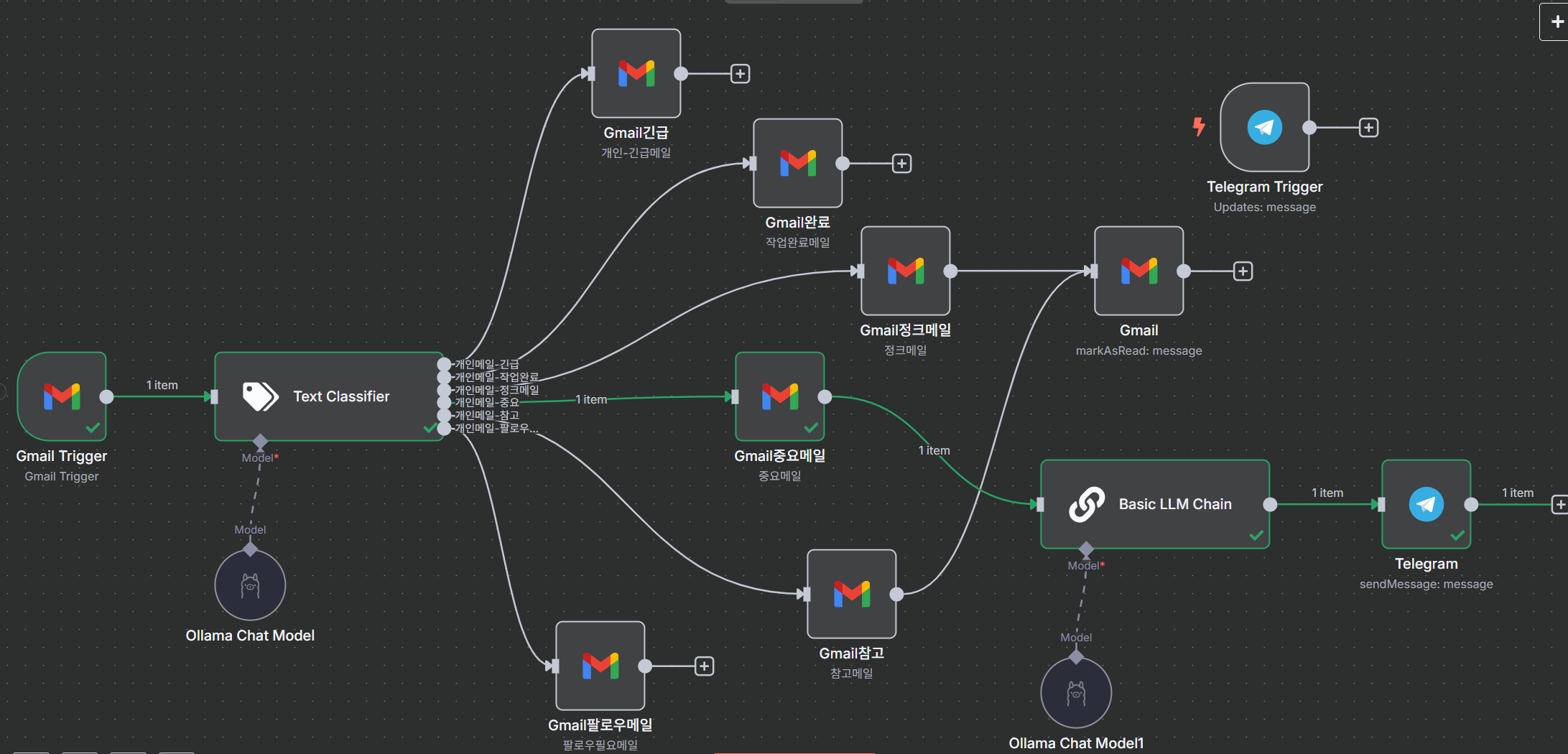
메일을 라벨링 다하고 중요메일에 대해서 텔레 그램으로 알림을 보내 줄수 있었다.
문제는 chat id를 가져와서 보내야 하는 상황이라 조금 고생을 했다. 초행길이라 힘들 수 있다 생각했지만 유튜브에서 본 내용으로 telegram trigger를 이용하는 방법이 확인이 안되었다. 그래서 조금 수정해서 확인했고 그 내용을 적어 보려 함다.
1. telegram에서 BotFather에게 챗봇 생성
2. access token를 이용하여 chat id 확인
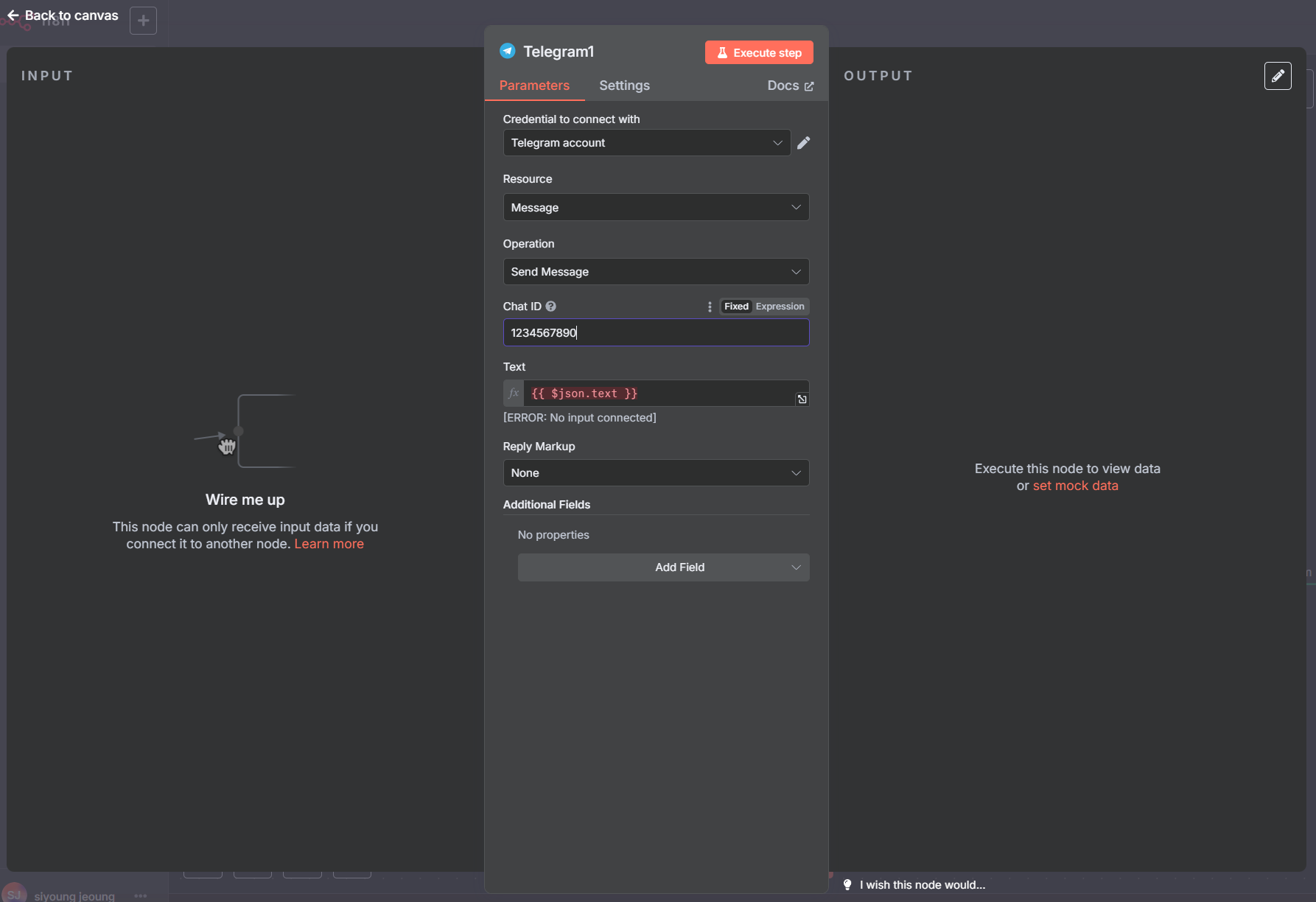
3. n8n 에서 Telegram sendMessage 등록
1. telegram에서 BotFather에게 챗봇 생성
봇파더를 찾아서 말을 걸으면 BotFather라는 봇을 사용하는 방법을 알려준다.
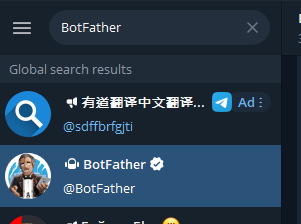
여기서 우리가 필요한것은 새로운 봇이다.
# /newbot - create a new bot

/newbot

BotFather,
Alright, a new bot. How are we going to call it? Please choose a name for your bot.
새로운 봇을 만들어 달라고하면 이름을 정해 달라고 한다. 다른 사람들이 사용하는 것과 겹치지 않도록 새로운 이름을 주면 접근 토큰을 준다.
siyoung jeoung, [2025-06-03 오후 8:22]
/newbot

BotFather, [2025-06-03 오후 8:22]
Alright, a new bot. How are we going to call it? Please choose a name for your bot.

BotFather, [2025-06-03 오후 8:24]
Done! Congratulations on your new bot. You will find it at t.me/si0_email_bot. You can now add a description, about section and profile picture for your bot, see /help for a list of commands. By the way, when you've finished creating your cool bot, ping our Bot Support if you want a better username for it. Just make sure the bot is fully operational before you do this.

Use this token to access the HTTP API:
7---------------------------------E     <<==접근토큰
Keep your token secure and store it safely, it can be used by anyone to control your bot.

For a description of the Bot API, see this page: https://core.telegram.org/bots/api
2. access token를 이용하여 chat id 확인
가장 간단한 방법은 텔레그램 라이브러리를 사용해서 채팅을 보내고 chat id를 확인하는 것이다.
n8n에서 확인하기 위해서는 뭔가 조건이 맞아야 하는지 서버를 접근할 수 없다고 404에러가 발생한다.
그래서 조금더 쉬운 것을 찾아서 참고용으로 공유한다.
파이썬 프로그램으로 토큰만 본인것으로 바꿔서 실행하면 chat id를 콘솔에 찍어 주는 것이다.
사전요구사항 : 파이썬 설치, 파이썬 라이브러리 설치
> pip install requests// tet.py
import requests
# 여기에 YOUR_BOT_TOKEN을 입력하세요.
BOT_TOKEN = 'chat_bot_token'
def get_chat_id():
"""
봇에게 메시지를 보낸 후 getUpdates API를 통해 채팅 ID를 조회합니다.
"""
url = f"https://api.telegram.org/bot{BOT_TOKEN}/getUpdates"
try:
response = requests.get(url)
response.raise_for_status() # HTTP 오류가 발생하면 예외 발생
updates = response.json()
if updates["ok"] and updates["result"]:
# 가장 최근 업데이트에서 chat ID를 찾습니다.
# 봇과 대화가 있어야 이 정보가 나타납니다.
for update in updates["result"]:
if "message" in update and "chat" in update["message"]:
chat_id = update["message"]["chat"]["id"]
print(f"Chat ID를 찾았습니다: {chat_id}")
return chat_id
elif "channel_post" in update and "chat" in update["channel_post"]:
# 채널의 경우
chat_id = update["channel_post"]["chat"]["id"]
print(f"채널 Chat ID를 찾았습니다: {chat_id}")
return chat_id
elif "my_chat_member" in update and "chat" in update["my_chat_member"]:
# 봇이 그룹에 추가되거나 제거될 때의 업데이트
chat_id = update["my_chat_member"]["chat"]["id"]
print(f"그룹/채널 Chat ID를 찾았습니다: {chat_id} (봇이 추가될 때)")
return chat_id
print("최근 업데이트에서 Chat ID를 찾을 수 없습니다. 봇에게 메시지를 보내보세요.")
else:
print("새로운 업데이트가 없습니다. 봇에게 메시지를 보내보세요.")
except requests.exceptions.RequestException as e:
print(f"오류 발생: {e}")
except Exception as e:
print(f"예상치 못한 오류 발생: {e}")
return None
if __name__ == "__main__":
print("텔레그램 봇 토큰을 사용하여 채팅 ID를 조회합니다.")
print("봇에게 메시지를 보내거나 봇을 그룹/채널에 추가한 후 이 스크립트를 실행하세요.")
chat_id = get_chat_id()
if chat_id:
print(f"확인된 Chat ID: {chat_id}")
else:
print("Chat ID를 얻는 데 실패했습니다.")>python tet.py
텔레그램 봇 토큰을 사용하여 채팅 ID를 조회합니다.
봇에게 메시지를 보내거나 봇을 그룹/채널에 추가한 후 이 스크립트를 실행하세요.
Chat ID를 찾았습니다: 1234567890
3. n8n 에서 Telegram sendMessage 등록
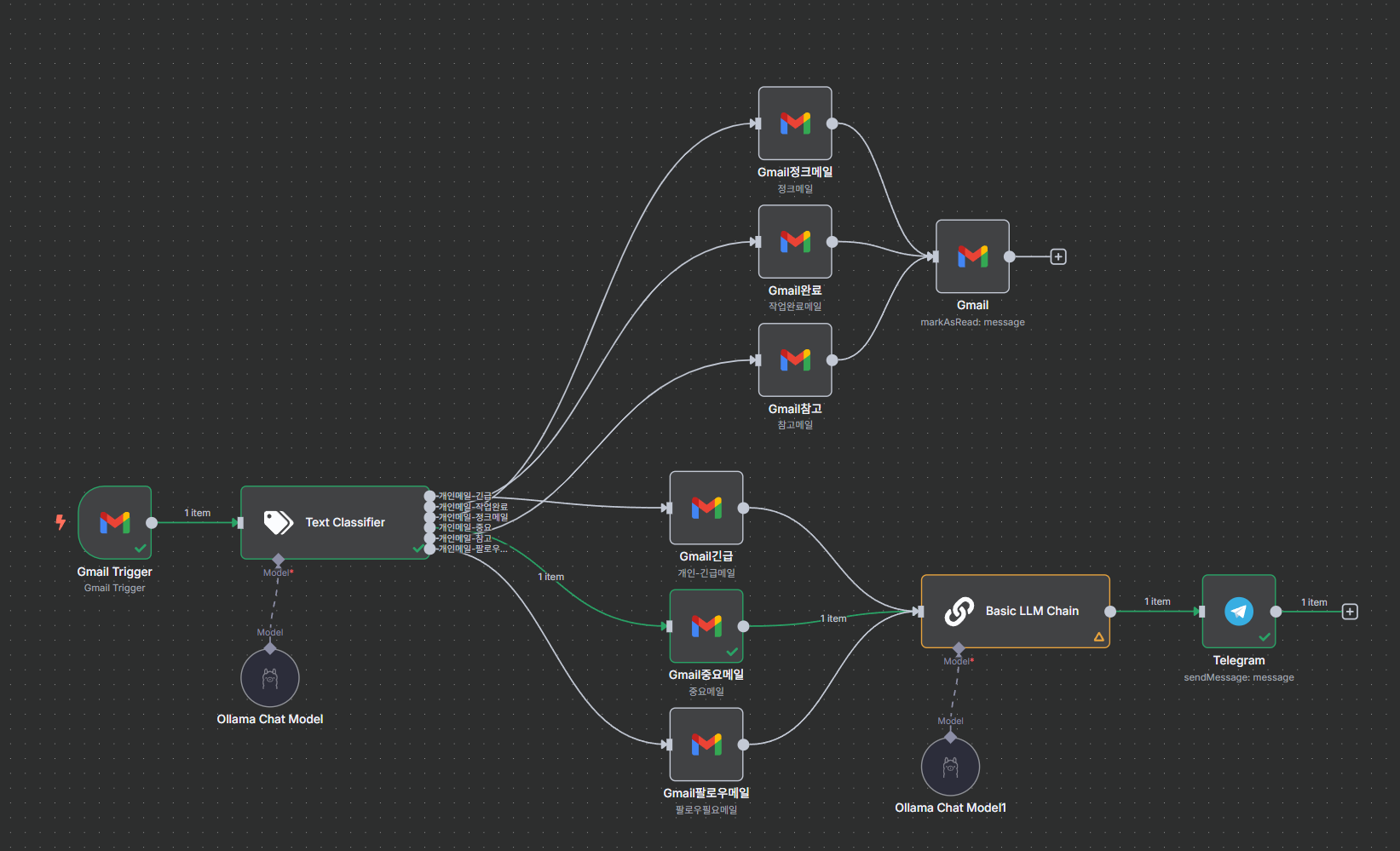
최종 메일 라벨링 n8n은 필요없는 것은 읽음처리해서 라벨링하고 확인이 필요한 것은 메신저로 알림처리를 구현했다.
'AI와 교육 > AI Literacy' 카테고리의 다른 글
| 문서 관련 AI(2025.06.04) (6) | 2025.06.04 |
|---|---|
| 이미지 생성 AI 조사 (2025.06.04) (3) | 2025.06.04 |
| 무료 vibe coding - vscode with docker ollama, continue (2025.05.27) (0) | 2025.05.27 |
| 기계학습 개발 환경 (1) | 2024.07.10 |
| 용어 정리_yolo학습시작부터(2024.07.05~ 진행중) (0) | 2024.07.05 |